MF SOFTWARE MFS Logo Moldflow Sales & Service GmbH
  • German
  • MFS Solutions
    • Simulation Time Steps
    • Strategy
    • Tool design
    • Part Design
    • Optimization after sampling
    • Customer Success Stories
      • Overview
      • LAMY
      • INPRO
      • FRAMAS
      • SIGNAL-CONSTRUCT
      • ENGEL
      • DRÄGERWERK
    • Products
      • Autodesk Fusion
      • Autodesk Moldflow Adviser
      • Autodesk Moldflow Insight
    • Automation
      • Overview
    • Validation
      • Material Service
    • Extended Capabilities
      • Therma-Flo
      • Meltflipper
      • Twino
  • PEG SOLUTIONS
    • Process Simulation
      • Injection Molding Simulation
      • Mold Analysis and Optimization
      • Process Optimization
      • Material Modelling – Moldflow
    • Structural Mechanics
      • Part Simulation
      • Mold Simulation
      • Competence Build-Up
      • Material Modelling – FEM
      • Integrative Simulation
        • Example Part Rotor
  • Academy
    • Training
      • Overview
    • Support
      • Overview
    • Certification
      • Overview
    • User Meeting
      • CONNECT
  • About Us
    • Overview
    • Team
    • Moldflow Blog
    • Autodesk Blog
    • Newsletter
autodesk-gold-partner-logo-rgb-black
You can see the tools of the generate mesh and also define the global edge length. But it also shows the general mesh information.

Why to mesh as a Dual Domain Mesh first?

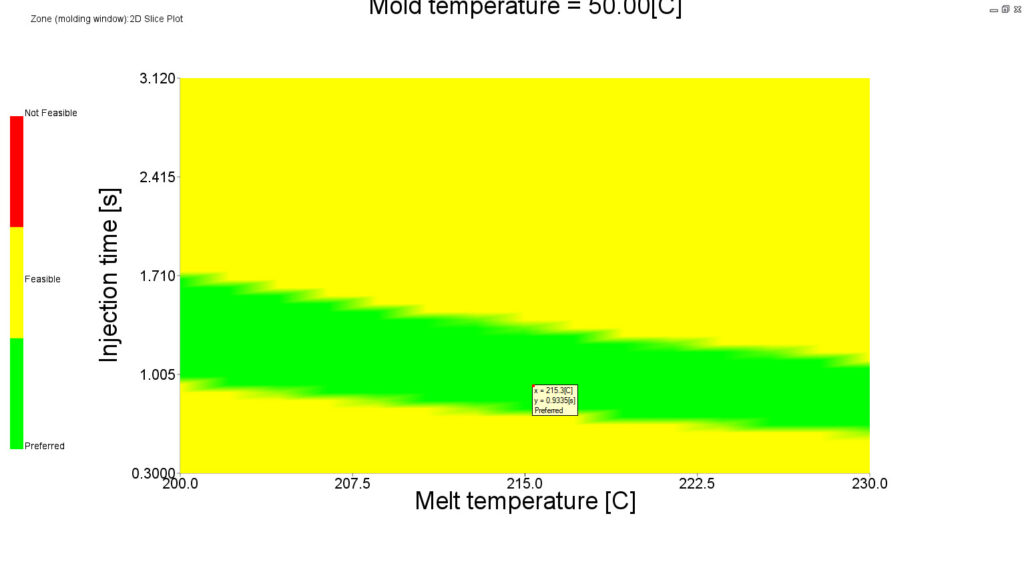
In the figure you can see a diagram showing the injection time and the melting temperature.

Why the Molding Window Analysis can be useful!

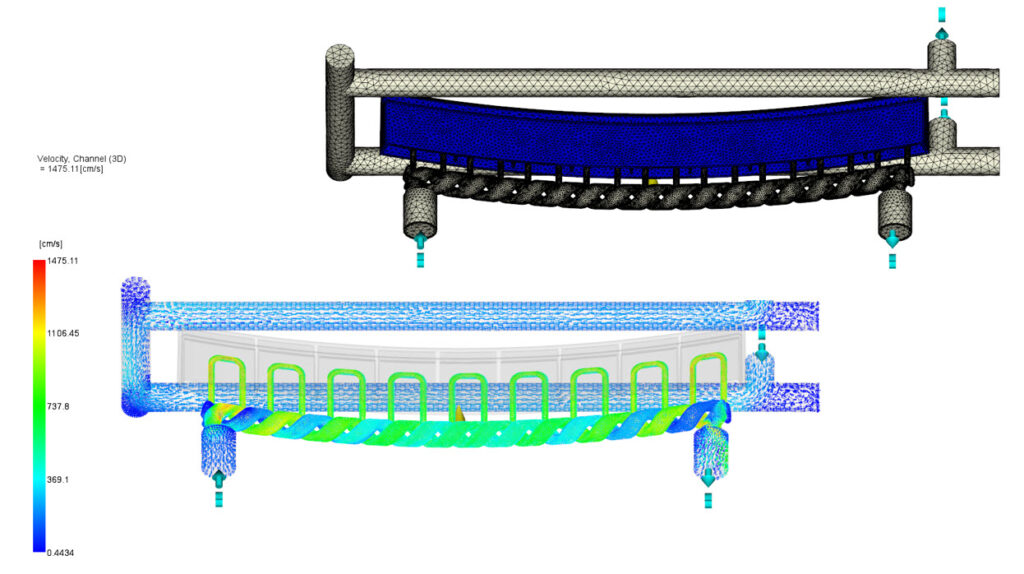
You can see two components showing the conformal cooling channels.

How to create Conformal Cooling Channels!

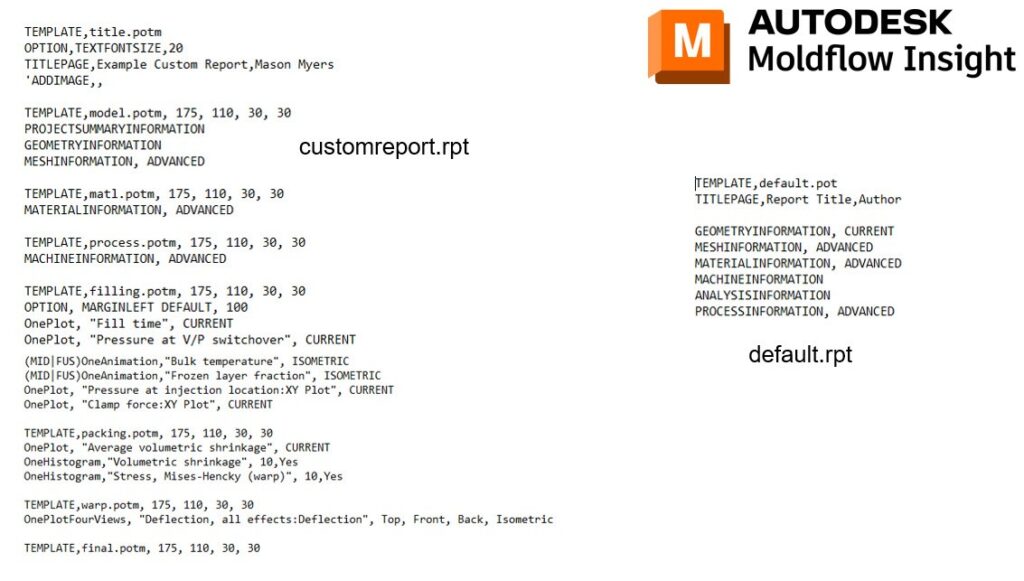
You can see the custom report and default report.

What modifications to make to the .rpt files!

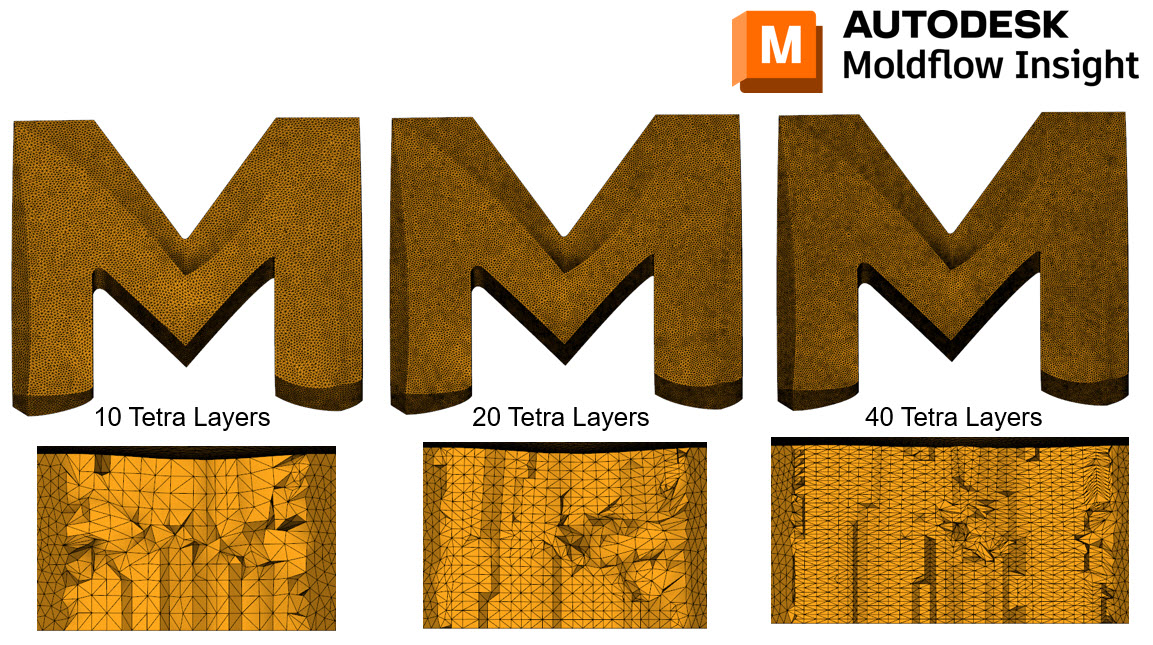
You can see 10, 20 and 40 Tetra Layers

How many tetras to use through the thickness in Moldflow Insight?

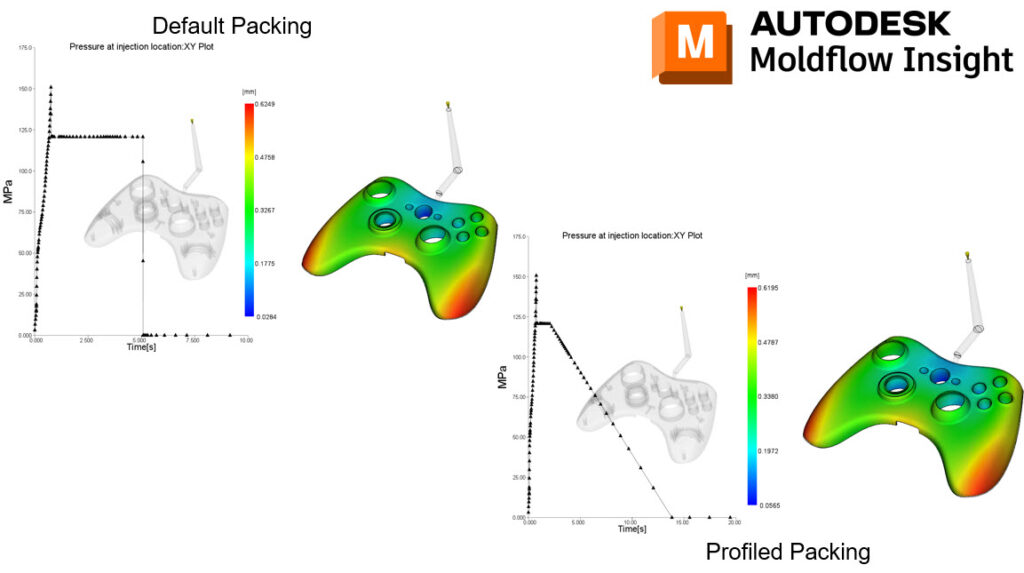
You can see two images. One is showing the default pack and the other shows the profiled pack!

How to use a profiled pack in Moldflow Insight?

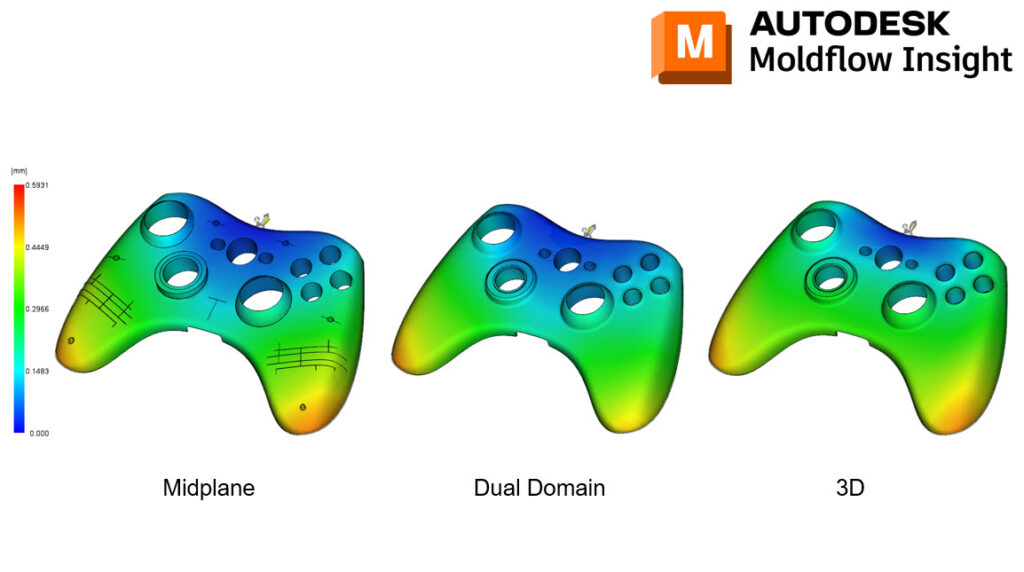
You can see three components. The first is for midplane, the secon for dual domain and the third for 3D.

Which mesh type should be used in Moldflow?

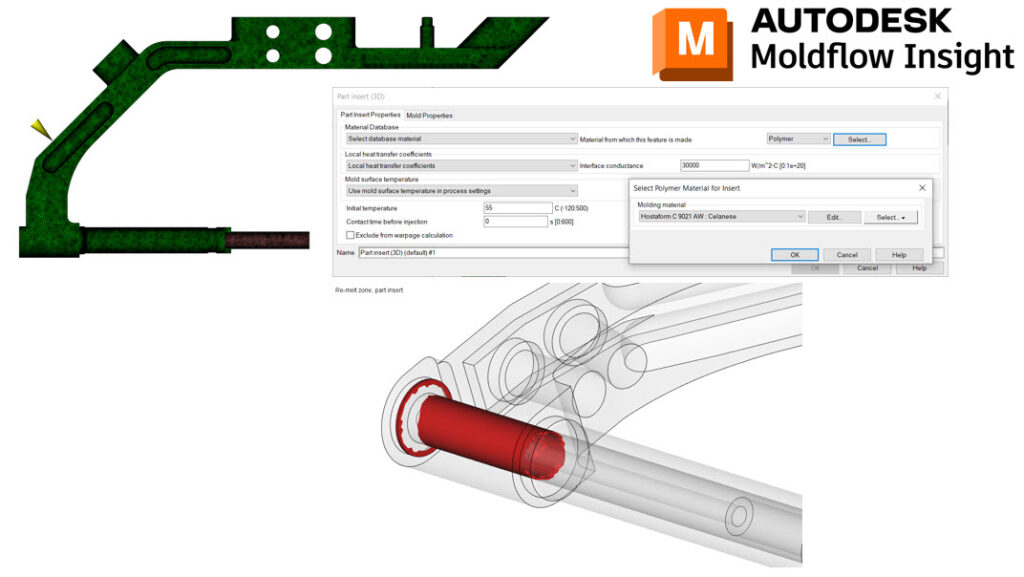
You can see a tool with an open window showing the part insert settings.

Why the re-melt plot within your analysis can be useful!

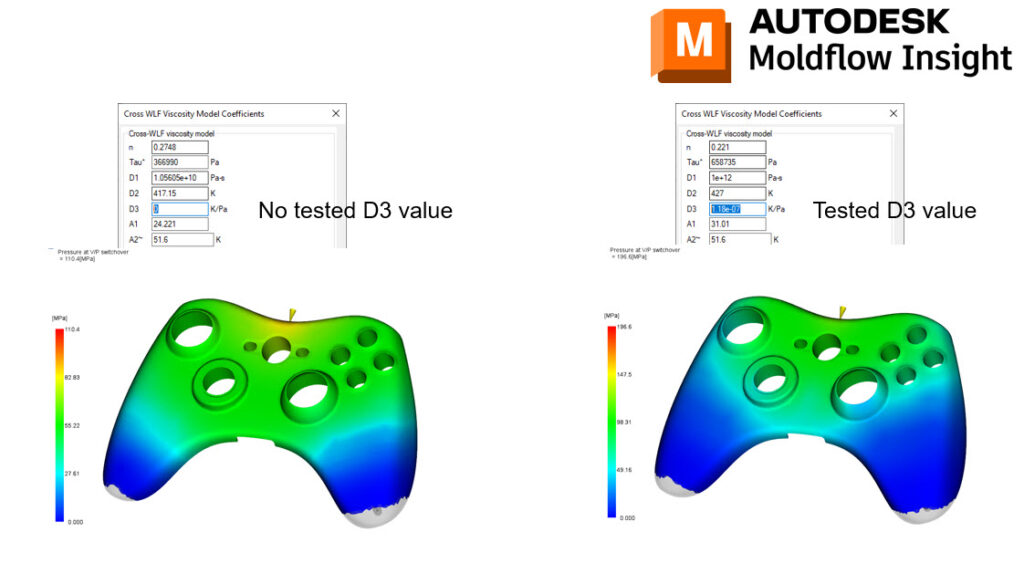
You can see two components in which one shows the no tested D3 value and the other the tested value.

The impact that D3 values can have on specific simulations!

You can see two fiber filled components in Moldflow and FEA.

How to take Moldflow results to integrative FEA via Helius and Digimat!

1 2 Next

Contact us now!

MFS

Together with you, we identify the ideal optimization possibilities for injection-molded components and tools. From our market-leading software solutions, training, support, or programming to custom injection molding and mechanical simulations.

Do not hesitate to contact us.

Data security | Imprint

autodesk-gold-partner-logo

Kontakt

contact@moldflow.eu
+49 (0) 6151 85040

Robert-Bosch-Straße 7, 64293 Darmstadt

Cookie-Zustimmung verwalten
Um dir ein optimales Erlebnis zu bieten, verwenden wir Technologien wie Cookies, um Geräteinformationen zu speichern und/oder darauf zuzugreifen. Wenn du diesen Technologien zustimmst, können wir Daten wie das Surfverhalten oder eindeutige IDs auf dieser Website verarbeiten. Wenn du deine Zustimmung nicht erteilst oder zurückziehst, können bestimmte Merkmale und Funktionen beeinträchtigt werden.
Funktional Always active
Die technische Speicherung oder der Zugang ist unbedingt erforderlich für den rechtmäßigen Zweck, die Nutzung eines bestimmten Dienstes zu ermöglichen, der vom Teilnehmer oder Nutzer ausdrücklich gewünscht wird, oder für den alleinigen Zweck, die Übertragung einer Nachricht über ein elektronisches Kommunikationsnetz durchzuführen.
Vorlieben
Die technische Speicherung oder der Zugriff ist für den rechtmäßigen Zweck der Speicherung von Präferenzen erforderlich, die nicht vom Abonnenten oder Benutzer angefordert wurden.
Statistiken
Die technische Speicherung oder der Zugriff, der ausschließlich zu statistischen Zwecken erfolgt. Die technische Speicherung oder der Zugriff, der ausschließlich zu anonymen statistischen Zwecken verwendet wird. Ohne eine Vorladung, die freiwillige Zustimmung deines Internetdienstanbieters oder zusätzliche Aufzeichnungen von Dritten können die zu diesem Zweck gespeicherten oder abgerufenen Informationen allein in der Regel nicht dazu verwendet werden, dich zu identifizieren.
Marketing
Die technische Speicherung oder der Zugriff ist erforderlich, um Nutzerprofile zu erstellen, um Werbung zu versenden oder um den Nutzer auf einer Website oder über mehrere Websites hinweg zu ähnlichen Marketingzwecken zu verfolgen.

  • Manage options
  • Manage services
  • Manage {vendor_count} vendors
  • Read more about these purposes
Einstellungen ansehen
  • {title}
  • {title}
  • {title}